Robin Good: 321Meet is a new web-based service which allows anyone with a computer to easily share the screen with anyone else connected to the Internet without the need to install or download anything.
The service is very simple to use. You only need to input your name, email and preferred password and you are ready to go.
321Meet utilizes a Java-based applet which automatically loads in the background without ever requiring any installation or download on the part of the user.
In a 321Meet event the meeting host can decide at any point to share his desktop or a specific applicaton or to let any of the participants share their screen in his place. Alternatively, any of the participants can "share" his own webcam video with everyone else.
Free to use. Ad-supported.
Upcoming Plus and Pro versions will offer an ad-free experience, multiple private rooms, a branded start page, password protection, extra security and more.
Robin Good: LiveMinutes is a real-time collaboration tool that enables you to leverage the good audio conferencing capabilities of Skype while providing you with an elegantly-designed interface to share and collaborate around documents and presentations.
Maximum capacity is around 20 participants with whom you can show any Office / OpenOffice document, PDF or presentation you have while also providing a live video of your selected presenter.
"When you change page or scroll to a paragraph, your guest's view is automatically updated, so you are always literally on the same page. You can also annotate your documents with sidenotes and drawing tools."
Not only. All your uploaded files are stored in a library where you can organize the according to types. 100MB capacity. (soon to be extended)
Other key features include:
Integrated Google Maps collaboration
Text chat
Meeting scheduling system
Participants rights management
Sketching and diagramming tools
Whiteboarding tools
Live minutes reporting including files and chat exchanges
Open API
LiveMinutes is free to use and will soon add additional capabilities including multi-point video conferencing.
I really like whatLiveMinutes offers and would recommend anyone to try it.
Robin Good: Idroo is a real-time collaborative whiteboard (for Windows PCs only) that allows 10 or more people to annotate, highight, draw and markup over any image they want to.
Idroo integrates perfectly with Skype allowing you to invite through Skype your meeting attendants and to talk to them while working together on the shared whiteboard.
"Grove is a hosted IRC service targeted at paying business clients who would use a private chat service to for internal discussions.
Grove is built on the IRC protocol and allows any business to set up its own web-based private IRC server that includes features such as archives, search and channel access controls."
"The first 30 days are free; after that, business pay according to their size: $10/month for five users, $25/month for ten users, $50 month for 20 users, and so on."
TransFire XP is the first Instant Messaging App for iPhone with real-time translated chat.
Say for example, your Argentinian cousin, Carlos, speaks only Spanish. With Transfire XP, you can now chat with each other in real-time, without any language barrier. Send a message wishing Carlos a "Happy Birthday!", and he will read "Feliz Cumpleaños!" on his phone. Carlos then responds, "Gracias," and you read, "Thank you."
TNT Creations announced today the release of their iPhone application, Transfire XP, free for a limited time.
Transfire XP brings the first chat and instant-messaging app with real-time, translated text. The application features a user-friendly interface, fast message delivery, and supports over 50 languages.
Transfire XP finds contacts on your local phone or device, and supports contacts from Gchat and Yahoo Messenger. Upcoming support for chat on Facebook, ICQ, Baidu is coming next.
The translation is made possible by integrating Google Translate.
CX (free to $19.99 per month) is a cloud-based syncing and storage back-up solution, similar to the well-known Dropbox, that gives you access to your files from virtually any Internet-connected device.
CX offers free downloadable software that works seamlessly on Windows and Mac, as well as free apps for the iPhone, iPod touch, and iPad.
Where native apps aren't supported—and they're notably missing from Android, BlackBerry, Windows Mobile, and Linux—a straightforward and responsive website, CX.com, stands in just fine.
The free basic account offers 10GB and all of the features.
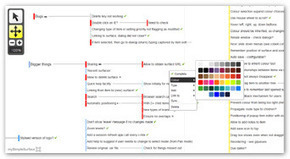
Mysimplesurface is a new kind of visualization and information-organization tool that sits between a mindmap, a project management and a task-list tool.
From the site: "My simple surface is fast and designed to manage lots of things in a semi-structured environment."
"...My simple surface is like a big white board for quickly and easily organising lots of things. When there's too much going on, you need space. You need a surface to put things on. Move things around. Step back. Organise, and re-organise."
Sets of information nodes can be organized into "surfaces", which are logical group of items connected together.
"Capture points quickly onto a surface. Organise, and re-organise later.
Create as many surfaces as you need and link them together. Manage large projects with inter-related surfaces. Organise them in the way that makes sense to you."
Surfaces can be shared with selected team members by inviting them via email through the dedicated Share function.
Buddymeeting is a new free and open-source web-based conferencing service which allows anyone to have an online meeting session with up to 25 people at zero cost.
Features include PowerPoint (and PDF) presentation support, video and VoIP, whiteboarding, screen sharing, text chat, and tele-conferencing.
Buddymeeting sports a clean and effective user interface, that is simple and intuitive to use.
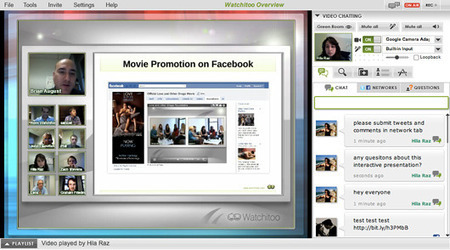
Watchitoo is a full collaboration and videoconferencing platform that can be embedded on any site.
Key traits:
Up to 25 (50 or 100 depending on your plan) people can actively interact with the video as a participant or a viewer, while up to 1000 can participate as pure viewers.
The technology exists not as a separate service, like WebEx or GoToMeeting, but rather as code integrated directly into the website.
This makes it easier to brand as your own, and since it’s embedded on your website, it’s easier for your participants to find and join.
Like other videoconferencing software on the market today, Watchitoo allows you to stream HD video, chat, share desktops, PDFs and videos and what the company calls “layers.”
“Like in broadcast television, a layer or multiple layers can now be added on top of the existing streaming content with Layers,”
The first layer is a simple identification label, which can be populated with a name, position and company. This then pops up over the video chatter who currently has the floor.
The second layer is a multimedia overlay to your video. This is called the Dynamic Visual layer, which lets you insert still and animated images, as well as flash content to help drive home your point or simply get people’s attention (look, it’s a blinky thing).
Another way to get people’s attention is to give them the option to weigh in on an issue. That’s where the third layer comes in: polls.
What really deviates from the video conferencing norm, however, is the last, e-commerce layer. This layer allows for organizations to make money off of what is being shown in the video.
Video conference organizers can pop up a checkout box, showing an article or product the viewer is currently watching.
Watchitoo works across platforms and mobile devices, and integrates also a full recording function (extra $5 per recording hour).
"Everyone likes personal cloud services, like Apple’s iCloud, Google Music, and Dropbox. But, many of aren’t crazy about the fact that our files, music, and whatever are sitting on someone else’s servers without our control."
OwnCloud allows you to set up your own cloud server for file-sharing, music-streaming, and calendar, contact, and bookmark sharing project.
“OwnCloud offers the ease-of-use and cost effectiveness of Dropbox and box.net with a more secure, better managed offering that, because it’s open source, offers greater flexibility and no vendor lock in."
OwnCloud enables universal access to files through a Web browser or WebDAV. It also provides a platform to easily view and sync contacts, calendars and bookmarks across all devices and enables basic editing right on the Web.
Programmers will be able to add features to it via its open application programming interface (API).
If you are looking for a super-simple drawing whiteboard where you can have more than one person contributing to the visual work, these are three simple solutions I suggest you explore:
"AlwaysOnPC also enables mobile collaboration: The Zoho Meeting web conferencing/screen-sharing solution relies on Flash and Java-applets and does not work on native mobile browsers.
However with AlwaysOnPC, users can initiate and host Zoho Meetings from iPad, iPhone, or Android with participants on any device or computer.
They can share their AlwaysOnPC screen to conduct presentations, demonstrations, webinars and more, and even delegate presenter controls to participants.
Similar mobile compatibility challenges face Office 365, Quickbooks Online, and even Google Apps such as Sites or Docs editing (especially Powerpoint presentations) which rely on desktop browser technology.
In addition to unlocking the full productivity promise of these cloud-based services on mobile devices, AlwaysOnPC also includes the OpenOffice suite, Gimp image editor, InkScape illustration program and Dropbox access."
From the official press release: "Many online cloud-based services like Zoho, Office 365, Sliderocket, and even many Google Apps rely on browser technology that doesn't work on mobile.
AlwaysOnPC gives users access to a complete virtual computer directly from their iPad or Android device, liberating them to use these powerful services.
For example, using Chrome inside AlwaysOnPC users can perform tasks in Zoho, Office 365, or Google Docs that are often difficult or impossible on mobile apps and browsers:
a) Create, upload or import documents and presentations from online storage or other web repositories;
b) Use full editing features, including the ability to create, re-touch, insert and re-size images, graphics, tables and charts into documents or Powerpoint slides;
c) Even copy and paste this rich content between apps, just like on a computer.
Robin Good: G-Recorder is a downloadable software for Macs and PCs which allows you to record any Skype call.
In addition G-recorder can keep track of your Skype chats even if you use multiple computers and different Skype versions. Since there is no easy way to back up or transfer your saved Skyped chats when you switch to new computer or reinstall your operating system, G-Recorder comes to the rescue by providing you with the possibility to save Skype chats into your email box (Gmail, Yahoo, AOL).
A free version recording up to 10 minutes per call is available and a 14-days trial is available for the Standard ($24.99 one time) and Professional ($39.99) one.
Robin Good: C2Call GmbH provider of the FriendCaller voice and video calling apps, has expanded its service with the introduction of multi-point video and voice conferencing capabilities supporting up to ten call participants.
FriendCaller supports Apple iOS devices including iPhone(R), iPod touch(R) and iPad(TM), Android(TM)-based smart phones and tablets, and the FriendCaller WebPhone at www.FriendCaller.com.
From their official press release:
"For now, we are starting by supporting up to four video participants, and up to six audio participants. Later this month, we will be demonstrating even more advanced capabilities at Mobile World Congress in Barcelona, including support for up to seven video participants, and up to 20 voice participants."
The service is based on an advertising business model which allows users to benefit from all FriendCaller features at no price.
The updated FriendCaller apps with the multi-point video conferencing feature are available starting today on the iTunes App Store, Android Market and the FriendCaller.com website.
N.B.: C2Call C2Call is the first company to offer free cloud hosted video and voice calls without the need to download software. C2Call's FriendCaller is the first free multi-point video calling app that works across all desktop browsers and smart phone platforms.
If you were waiting for Google to release a screen-sharing feature inside the Hangout real-time collaboration platform, that time has come.
In the next 48 hours Google will be rolling out to all Google+ users the ability to screen-share during any hangout session.
From Christopher Johnson G+ post: "When we launched Hangouts with Extras last September, we wanted to test new features and get feedback from users.
We’ve learned a lot over the past few months, and today we’re rolling out a new Hangouts look and feel that incorporates some of the “extras,” and better reflects Google’s overall design ( http://goo.gl/gG1NA ).
Highlights include:
- Screensharing: share what’s on your computer screen with everyone in the hangout. This is the first of many extras we’re graduating to Hangouts proper.
- Biggervideo: we’ve put more emphasis on the live video itself by optimizing white space and other screen elements."
If you are looking for a browsable round-up of web conferencing platforms and their main key characteristics and traits, you can take a pick at this article-report from Social Business Today.
It lists 15 web conferencing services while providing some useful complementary information for each one, including key features, availability of a trial, and pricing.
Consider this a basic reference to get an idea about differences between major services, but do not rely too heavily on it as my impression is that it is not fully updated and some of the info there contained is actually not correct or incomplete (pricing without correspondent information on what relative capacity it affords is useless) (I am also a bit skeptical in relying on sites that do not provide clear author info).
Still, if I had someone just ask me now where he could find a basic reference for some of the available web conferencing solutions I would suggest them to take a peek at this article.
...and if I had to make my recommendations among those listed, these are the three services I woud suggest you to consider:
a) GotoWebinar - my choice and favorite (yes, it's too expensive)
Zovo is a cloud-based file storage and backup service which offers unlimited storage space and bandwidth to subscribers along with some very unique features.
Among them I have noted:
Automatic backup in the background
Automatic file monitoring and saving
Automatic file history to up to 30 revisions
Automatic recovery of any deleted file
Sync files between your computers
Get a virtual drive on your PC or Mac - works like an external drive (Pro version)
Stream your music & movies to your iPhone or iPap - Free app
View and edit any documents (Pro)
Share files with friends or co-workers in one-click (Pro)
A cookie-shaped, easy-to-use, $199 video-conferencing solution that you pay for once and then use forever.
Introduced last month at the Consumer Electronics Association’s annual New York-based CES Unveiled preview event (CES 2012 kicks off on Jan. 9 in Las Vegas), the Biscotti TV Phone is a home video-conferencing gadget that works with your HDTV.
Each biscotti-cookie-shaped unit cost $199 and works with any other unit via Biscotti’s proprietary network. You can also chat with anyone on GChat (sorry, no Skype).
Biscotti is not the first HDTV video conferencing solution. Most notably, Cisco (with UMI) and Google and Logitech (with Google TV and the Revue) have made the leap.
The device connects to your HDTV via an HDMI cable. Unlike most other HD devices, Biscotti actually has you run your cable box connection through the device. So the back sports both HDMI-in and HDMI-out ports. Biscotti conducts the video calls over the Internet, which means you’ll need Wi-Fi to use it—there’s no wired, Ethernet option.
Video resolution is at 720p, and the videocamera is equipped with a wide-angle lens (you can digitally zoom and pan, as well).
Simplicity could help Biscotti succeed where others have failed this holiday season. To be fair, the Logitech review camera is cheaper (by $50), but you have to buy Logitech’s Google TV box to use it. Cisco’s UMI is $100 more for a 720p device and you have to pay for the UMI service: $9.95 a month or $99 a year.
N.B.: Biscotti is pay once, use forever—or at least as long as Biscotti lasts.
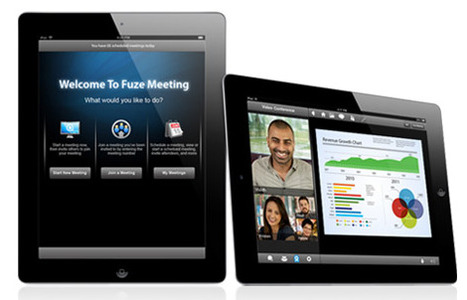
Fuze Meeting is a free web conferencing and online meeting software that allows desktop and screen sharing on Mac, PC, iOS and Blackberry devices.
Key features include:
Multi-party HD Video Conferencing
Webinars up to 100 participants
Meeting Recording
Site Branding
Unlimited Toll Audio Conferencing
Unlimited Storage Space
Screen Sharing with Remote Desktop Control
Interoperability with enterprise video-conferencing systems such as Microsoft’s Lync, Tandberg, LifeSize, Polycom, and Teliris, and all Android, IOS (Apple), and Blackberry mobile devices.
A Personal plan account (25 attendees) starts at $29/month, the Plus is $49 (45 attendees) and the Professional is $69/mo. (up to 100 attendees + meeting recording and site branding).
Tired of squinting in front of a small laptop screen for the next videoconference?
The Warpia ConnectHD device provides users with an easy way to stream content wirelessly (up to 1080p HD video quality) from any laptop computer to a television screen or HDTV without any limitation.
ConnectHD integrates a wide-angle HD video camera and a multidirectional microphone, and it provides the perfect technology fit to do videoconferencing from the comfort of your living room, and with the great view offered by your large screen TV monitor.
One of the best videoconferencing and online collaboration tools, Vsee, has finally released a Mac version of its cool technology, enabling scores of new users to take advantage of this largely unknown but very effective collaboration technology.
Vsee integrates cool unique features which it has pioneered over the last 6 years, and I am incredibly excited to see that they have finally released a working Mac version.
If you have never seen VSee, expect to see a slim real-time collaboration tool with advanced features, and good usability. VSee includes video conferencing with HD video-quality, screen sharing and remote control, text chat, file sharing and the rare ability to connect flawlessly also over slow Internet connections or even 3G cellular.
Quick Screen Share is the simplest and easiest solution to share your screen with someone else without spending a dime.
Just head to http://quickscreenshare.com/ type your name and click start. A Java plug-in will need to be authorized and after it loads you will be given a URL which you can give out to your contact.
Key features in summary:
- No registration required and completely free.
- Nothing to install for sharer or sharee. - Works on Windows, Mac, and Linux. - Even lets you remotely control mouse and keyboard
P.S.: This free service is a side project from the creators of Screencast-O-Matic.com and is still in BETA. The current version creates a direct peer-to-peer connection, so if you're on a super duper secure school or company network it may or may not be able to connect.
Pligus is a new free web collaboration and conferencing service which allows you to create a permanent and "persistent" collaboration workspace in which to meet with your contacts.
Plingus works across operating systems, and it integrates video, audio conferencing, white boarding, screen-sharing (Windows only), map sharing and text chat.
The free version accomodates up to 4 concurrent users per session, but doesn't allow for private rooms and it is ad-supported.
The paid version runs $19/month, can have up to 20 participants, has priority support, private rooms and no ads.
Actually, you can even start a collaboration session without even registering.
Stixy is a new collaboration workspace which makes it easy to create permanent private spaces in which multiple people can add, edit and update notes, photos, documents and to-do lists.
To get content containing either thought or leadership enter:
To get content containing both thought and leadership enter:
To get content containing the expression thought leadership enter:
You can enter several keywords and you can refine them whenever you want. Our suggestion engine uses more signals but entering a few keywords here will rapidly give you great content to curate.


 Your new post is loading...