InstantMeeting automatically identifies conference calls in your calendar and recognizes the notable details (time, phone number, dial-in code, etc).
InstantMeeting connects you to your conference call or notifies attendees that you will join shortly - all at the single touch of a button.
InstantMeeting also allows you to choose your alert time and it is compatible with iPhone, all Android and Blackberry devices, as well as PCs running Outlook.
Keep The Record is a new online collaboration service which allows you to instantly create a free teleconference for up to 10 people to which you can invite other contacts by email, phone or sms.
Those on a computer can join in by going to the specific unique URL that is generated for you when you start a conference, and those that have only access to a telephone can connect in by dialing a specific 877 (US) number.
The full conversation is automatically recorded and made immediately available to those who participated right after the meeting is over.
The interface is basically non-existent making it extremely easy for non-technical people to use this tool effortlessly.
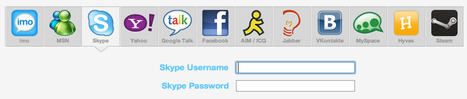
The Imo instant messenger is a web-based service capable of linking up to all of your instant messaging accounts, from MSN to Skype, Yahoo Messemger, AOL, Jabber and more.
Imo has integrated video and voice chat functionalities and it is free to use.
How it works: Initiating a Facebook-to-Facebook call from within Skype is quite easy; all you need to do is connect your Skype and Facebook accounts.
Then, select a Facebook friend and hit the video call button in Skype- your friend simply picks up the call from Facebook.
This new feature lets you maintain social connections with your Facebook friends and compliments previously announced features such as being able to see when your Facebook friends are online, read their status updates and IM them all from Skype.
From the article: "Everyone wants to be in on the conversation, but sometimes distance can make in-person meetings hard.
We tested five multiperson video chat services--Google Hangouts, Skype Premium, Tinychat, AV by AIM, and AnyMeeting--to find the best place to conduct a group meeting online.
A lot of variables can affect the performance of a video chat service, from the available bandwidth to the quality of the participants’ webcams. In our lab tests, we set up five computers to video chat with one another: two desktop PCs, two Windows laptops, and a MacBook.
We provided ethernet connections for the desktops and wireless Internet connections for the laptops. We also looked at how easy it was to set up and use each service, and considered whether each service had any extra features (such as text chat or video silencing) to enhance video chat.
Here’s what we found."
Apples and oranges being compared. The lack of a common use case makes this comparison only partially useful.
Rondee 2.0 is a telephone-conferencing with web-based scheduling and response tracking service.
The new free service allows users to have access to a single platform providing the choice of scheduling a conference in advance with RSVP tracking or conferencing on demand.
Additionally, users now have the option of customizing a variety of features such as configurable greeting tones, audio recording, detailed call reporting.
These features can be customized for each conference PIN and users may have an unlimited number of conference PINs. After several months of successful testing with thousands of conferencing organizers, these options are available to the entire Rondee community of users.
Robin Good: Syncdoc allows you to backup online, sync computers, and share files while leveraging the distributed and massive storage capabilities of Google.
Syncdocs syncs folders between all your PCs and smartphones and Google Docs and allows you to map Google as a your network gDrive.
Select a folder on your PC, like “My Documents”. Syncdocs copies this folder online and then keeps it in sync across all your PCs giving you access to all of your files even when you are offline.
Syncdocs syncs unlimited files for a year for just $19.95 .
oneDrum, a UK-based software development company, today launched its intuitive peer-to-peer (P2P) desktop application that lets users securely co-author, file-share and interact in real time on Microsoft Office applications.
The application brings Google Docs functionality and more to Microsoft Office documents, with edits appearing in real time when working online, while offline edits synchronize effortlessly when connectivity is re-established.
oneDrum is written in Java, allowing the application to support multiple operating systems. The software supports all versions of Microsoft Office in a Windows environment. Mac for oneDrum will launch in beta in Q4 2011.
N.B.: In February 2012, a premium, subscription-based version will be released providing a variety of extra features such as backup to the cloud and a self-hosted enterprise option.
From the article: Standard whiteboards aren’t cutting it anymore in an age where everyone in enterprise is concerned with sharing and collaborating over projects via the cloud from anywhere, anytime.
Additionally, content on whiteboards don’t typically show up very well when in video conferencing mode.
Polycom is trying to meet both of these challenges with the introduction of the Polycom UC Board, which basically shares content written on the whiteboard to all screens and mobile devices that are connected to the video meeting.
Along with sharing presentations, the UC Board software enables conference participants to use the UC Board to write, annotate or highlight key points directly on top of the shared content in real-time.
The UC Board solution is comprised of a compact infrared sensor that attaches to a whiteboard or LCD screen, along with a wireless stylus that meeting hosts can use to write and sketch with just like any regular pen or marker.
Such a solution is especially targeted at students and professors, doctors, architects, and marketing departments.
Naturally, there is a catch. Anyone who wants to use this product must already have a Polycom HDX series video communications system already set up.
At that point, it should be relatively simple to use (in theory) as it is touted as a USB plug-and-play configuration.
The Polycom UC Board solution is available starting today for $1,999.
Vidyo, a company whose technology connects disparate video endpoints via corporate networks and the Internet, announced support Thursday for its VidyoMobile offering on Apple's iPad2, iPhone 4S, and the iPod Touch.
An application to run natively on those devices is available for download in Apple's App Store. In addition, a beta version of VidyoMobile for Google Android devices is also available, while a general availability version is expected by the end of November.
The additions enhance the capabilities of the Vidyo platform, which delivers high-definition videoconferencing images to a variety of endpoints, including room-based systems, desktops, and portable devices.
Videoconferencing system provider Polycom is joining a host of competitors and adding tablet computers to the array of desktop and room systems that can be used for participating in a video conference call.
Its RealPresence Mobile software is available for a free download at the Apple App Store to run on the Apple iPad 2 and at the Google Android Market to run on tablet computers such as the Samsung Galaxy Tab and Motorola Xoom.
...
In a preview of the application on an iPad for InformationWeek, it was shown how RealPresence Mobile delivers all of the functionality of a desktop or room system, such as dividing the screen up to show all participants, adding video, documents or a PowerPoint presentation, muting and unmuting video and audio as necessary, and others.
Kerio Workspace has some features in common with collaboration solutions such as Basecamp, but without the project management features.
It has more in common with file-sharing solutions such as ShareFile and with enterprise microblogging solutions like Flowr.
Kerio has a system for tracking changes, and social elements like a “news feed” where co-workers can post what they’re working on. It also lets users create internal “web pages” to display documents, audio and video, and users can specify if they wish to receive alerts by email.
Kerio Workspace 1.1 can be hosted in-house on your organization’s servers under Windows, Mac, Linux or VMWare. Pricing starts at $150 for a 5-user license. Additional user licenses are $30 each.
Hall.com is a new web-based collaboration service which allows you to create a public (or private) conversation hall in which specific topics can be discussed, custom polls, voting and selecting tasks or things to do is made as easy and effective as possible.
Hall.com integrates in fact four on-demand modules to create Polls, Rank items, create To-Do lists and to write Notes collaboratively.
The collaborative spaces created are persistent and each one can have its own custom URL.
The service is free and you can try it out immediately here: http://hall.com/
ISL Online, an online collaboration solutions provider, has just launched a new free web conferencing service called Team Hangout.
This new service is optimized for very simple one-click online meetings.
The new web-based service starts a free online meeting directly from Facebook or the teamhangout.com website and lets users instantly share screen and perform video conferences.
The service is based on the online meeting software ISL Groop, but unlike ISL Groop it is completely free of charge for private and business use (Windows, Mac and Linux). The Team Hangout service includes:
Video conferencing: live chat, VoIP audio, webcam video
Automatic sound and video device detection – no settings required
USB audio device hot-plugging during a web conference
Share live content: screen sharing, application sharing, region sharing
Share static content: PowerPoint presentation, images, clipboard content, a snapshot of live screen, text
File sharing
Annotations: text, arrows, highlighter, pen
Highest security: AES 256 Bit SSL.
Team Hangout is a completely free web conferencing service, it’s not ad-supported and does not require any registration.
Online meetings started through teamhangout.com are public and can be joined by anyone visiting the website.
On the other hand, a user can connect the free web conferencing application with his Facebook account. This option gives users considerably better privacy as online meetings started from Facebook can only be seen and joined by the user’s friends if they have the Team Hangout installed.
I wasted 30 min on ISL Teamhangout setup in Facebook, download plug-in etc. It simply doesnt work and there are no user friendly prompts or instructions to make it work. Better avoided
“Google Chat makes it easy to chat with people you have relationships with. In Google+, you can chat with anyone in your Circles who also has added you to their Circles. And, when you’re not using Google Plus, you’ll still be able to chat with them using Google products including, Gmail, the Google Talk client, iGoogle, Orkut and 3rd party apps.”
Previously, you could only chat with people if you knew their email address, so this opens up a whole new line of instant communication, and eliminates one of Facebook’s advantages in terms of features.
Buzzumi is a new online service which allows you to easily create a webcast in which you can transmit your audio and video signal, while attendees can text chat back at you.
Once you signed up, starting a new webcast is as easy as clicking Start. Webcasts can be "private" or "public" and you can decide whether they are free or paid and how much is the charge to get in.
Finally you can personalize the "look" of your webcast by selecting an existing wallpaper image or uploading your own.
Robin Good: Titanpad is a web-based collaborative document editing tool that allows any number of people to work collaboratively and simultaneously on the same document.
Every user gets automatically a different color, there is no need to sign-up, and best of all there are infinite levels of Undo and you can have a dedicated subdomain where to host your collaborative docs.
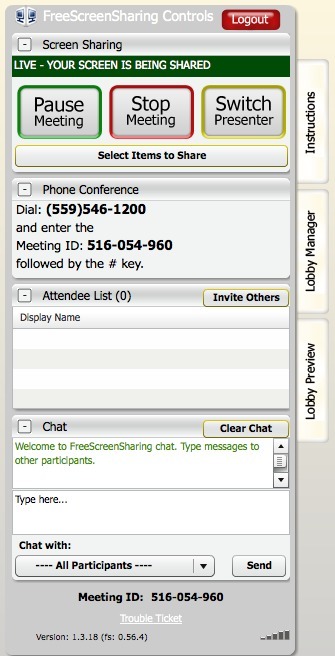
Robin Good: FreeScreenSharing.com is a new webconferencing service that integrates screen-sharing, text chat and audio conferencing in a simple and free to use tool.
FreeScreenSharing can accomodate up to 96 concurrent participants and any account can have a maximum of 6 hours per month of use.
The service integrates a US-based toll-free tele-conferencing service and provides multiple options to customize and personalize the customer interface.
The technology makes use of Java and Javascript and can be accessed easily with both PCs and Macs.
As for another past freebie conferencing system, Freebinar (now Anymeeting), I can't avoid to note how much the control dashboard of FSS closely replicates in many instances the original GoToMeeting UI, though there exist some key differences.
From the article intro: "Dropbox recently introduced Dropbox for Teams, a new service designed for enterprise use.
Like the consumer version, Dropbox for Teams allows business teams to share documents, photos and videos in the cloud across multiple device operating systems, including Android, BlackBerry, Linux, iOS, Windows and Mac.
Dropbox for Teams gives IT more control of cloud storage by providing the ability to add and delete users.
Along with administrative controls, Dropbox for Teams centralizes billing and phone support.
The service costs $795 a year for five users with additional seats costing $125 each.
The basic plan has 1,000 gigabytes of cloud storage with each additional user adding 200 gigabytes more."
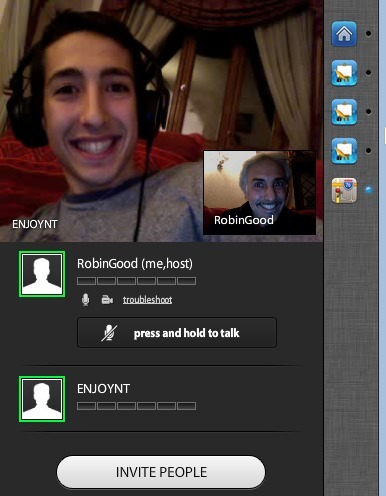
Robin Good: Hoot.Me is a Facebook application that allows you to video-conference with up to 8 people, screen-share with no extra software installation, and chat with your FB contacts.
Designed for collaborative study sessions it offers a unique approach to make Facebook a just-in-time study-oriented platform.
Other interesting info-bits from the About page: "Smart chat allows typed math equations to be automatically reformatted to look the way they should.
Sessions are stored, so you can get your help from past conversations too.
Don’t want your studies to be public? No problem. With private sessions, you can invite only the people you want by sharing the link.
If you’re a teacher, you can use this for your class to hold virtual office hours or answer homework questions.
You don’t have to be Facebook friends to collaborate on Hoot."
LiveMinutes is a new innovative and easy-to-use free web conferencing tool which allows you to easily share documents, images and video clips while talking live with your connected participants via an integrated Skype facility.
LiveMinutes integrates also a whiteboard, the ability integrate and annotate maps, auto-creation of meeting minutes, a text chat area and a full attendees list.
Last but not least the host can choose between multiple simultaneous open microphones or two-at-a-time modality.
Nota is a unique, cutting-edge collaborative web platform that allows users to create, share and collaborate on presentations and virtually any other form of online material.
Using Nota’s proprietary toolset, users can instantly integrate text, video, maps, clip art, photos from web album or on the local computer, or license-free images from Flickr, and material from an ever-expanding array of sources.
Users can then instantly embed their work in Facebook or blogs, and can share and collaborate with friends.
To get content containing either thought or leadership enter:
To get content containing both thought and leadership enter:
To get content containing the expression thought leadership enter:
You can enter several keywords and you can refine them whenever you want. Our suggestion engine uses more signals but entering a few keywords here will rapidly give you great content to curate.


 Your new post is loading...